Understanding Your Digital Domain: Building a Strong Online Presence
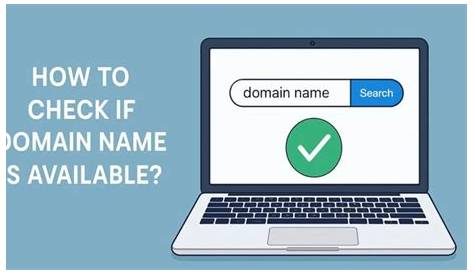
As a small business owner, establishing a digital domain is essential for creating an online presence and reaching potential customers. Your digital domain is your unique address on the internet, where customers can find information about your products or services. It serves as the foundation of your online identity and is crucial for your business's visibility and credibility.
What exactly is a digital domain and why do I need one?
A digital domain is your unique address on the internet, typically represented by a domain name like www.yourbusiness.com. This domain is essential for establishing your online identity; it’s how customers find you among competitors. Think of it as your business's virtual storefront. When someone types in your domain name, they should be directed to your website, where they can learn about your offerings, contact you, or make a purchase. Without a digital domain, potential customers may struggle to find you, diminishing your visibility and credibility. An online presence is crucial for growth and survival, providing a platform to showcase your products, engage with customers, and build your brand.
How do I pick the perfect domain name?
Choosing the right domain name is vital for your digital presence. A strong domain name should be memorable, relevant to your business, and easy to spell. Incorporate keywords that reflect your business or industry to improve your chances of appearing in search results. For instance, if you own a bakery, a name like "DeliciousBreads.com" might be more effective than something generic. Avoid using numbers or hyphens, as they can confuse potential visitors. Ensure your desired name is available and not trademarked by another business. A well-chosen domain name can enhance your branding and make it easier for customers to remember your website.
What platforms can I use to create my digital domain?
There are several platforms available for creating your digital domain, each with its strengths. WordPress is one of the most popular options, offering flexibility and a wide range of themes and plugins to customize your site. It’s ideal for businesses that want full control over their website design and functionality. Wix and Squarespace provide user-friendly interfaces with drag-and-drop features, making it easier for those who may not have technical skills. Wix offers a free plan with basic features, while Squarespace is known for its visually appealing templates, although it typically requires a subscription. Assess your needs, budget, and technical comfort level when choosing a platform to ensure it aligns with your business goals.
How do I optimize my digital domain for search engines?
Search engine optimization (SEO) is key to improving your digital domain's visibility. Start by incorporating relevant keywords throughout your website content, particularly in titles, headers, and descriptions. Meta tags are also important; they help search engines understand what your site is about. Focus on creating high-quality, engaging content that answers potential customers' questions or addresses their needs. Regularly updating your content signals to search engines that your site is active, which can help boost your rankings. Remember, SEO is an ongoing process; staying informed about best practices will help your site remain competitive. Avoid common pitfalls like keyword stuffing, which can lead to penalties from search engines.
What are the ongoing responsibilities for maintaining my digital domain?
Maintaining your digital domain involves several key tasks to ensure it remains effective and secure. Regularly update your website’s content to keep it fresh and relevant. This could include adding new products, writing blog posts, or sharing customer testimonials. Security is another critical aspect; ensure your website has an SSL certificate to protect visitor data and consider regular backups to prevent data loss. Monitor your site's performance using analytics tools to understand visitor behavior and adjust your strategies as needed. Staying proactive about these responsibilities will help you maintain a strong online presence and build customer trust.
Conclusion
To start building your digital domain, focus first on selecting a memorable and relevant domain name. This choice will set the tone for your online identity. Once you have your domain, select a website-building platform that meets your needs, whether that’s WordPress, Wix, or Squarespace. Implement SEO practices to ensure your site is easily discoverable. Finally, keep your site updated and secure to effectively engage your audience. A well-maintained digital domain can lead to increased visibility, customer engagement, and ultimately, business growth.
Frequently Asked Questions
What is the difference between a domain name and a website?
A domain name is the address people type into their browser to access your site, like www.yourbusiness.com. A website is the collection of web pages and content that visitors see when they reach that address.
How much does it cost to register a domain name?
Domain registration costs vary widely, typically ranging from $10 to $50 per year, depending on the domain extension and registrar you choose.
Can I change my domain name later?
Yes, you can change your domain name, but it's not a simple process. It can affect your search engine rankings and requires updating links and marketing materials to reflect the new name.
How long does it take to set up a digital domain?
Setting up a digital domain can take anywhere from a few hours to a couple of days, depending on how prepared you are with the domain name choice and website content.
What should I do if my desired domain name is taken?
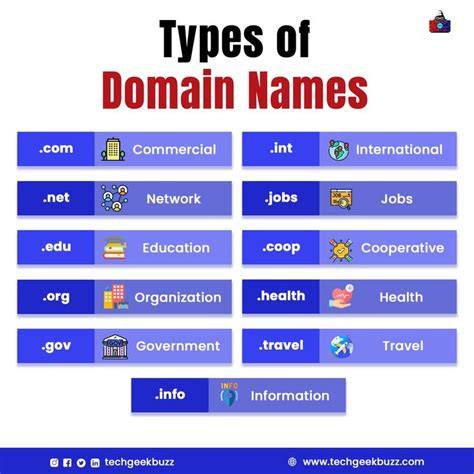
If your desired domain name is taken, consider variations of that name or try different extensions, like .net or .co. You can also check if the current owner is willing to sell it.